Buy off-lease business-class machines, ignore cosmetic grades except as a discount lever, verify battery health and SSD storage, demand at least a 90-day warranty with a 30-day return window, and test everything within the first 72 hours.
Learn what refurbished grades really mean, how to vet sellers and warranties, and which specs matter for office work before you buy refurbished computers.
By Editorial teamPublished Last updated 11 min read
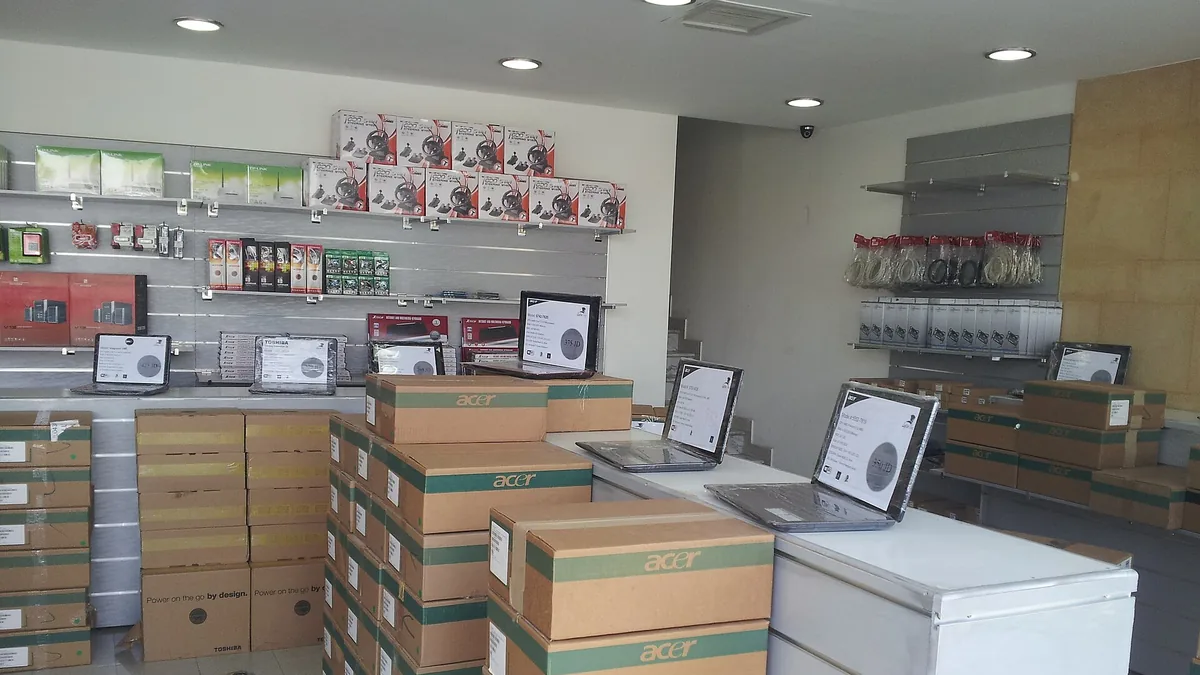
A Jordan laptop shop displays laptops on desks with stacked Acer boxes Photo: Adamrabah, Wikimedia Commons, CC BY-SA 4.0.
Buying refurbished computers is a practical way to equip a small office or nonprofit at roughly half the cost of new hardware, and it keeps functional machines out of the waste stream. The confidence part comes down to three things: understanding what refurbishment grades actually describe, buying from sellers who test and stand behind their stock, and knowing which specifications still matter for everyday office work. Get those right and refurbished is a low-risk purchase; skip them and you are gambling.
Why is buying refurbished computers a sustainability decision?#
Refurbished computer purchases are a sustainability decision because extending the life of existing hardware avoids most of the environmental cost of manufacturing a new machine. Electronics production is resource-intensive: producing a single laptop generates the majority of its lifetime carbon footprint before it is ever switched on, mostly from raw material extraction, chip fabrication, and assembly. Extending the usable life of existing hardware by even two or three years is one of the most effective technology sustainability moves a small organization can make, and it costs less than buying new rather than more.
E-waste is the other side of the equation. Discarded electronics are among the fastest growing waste streams worldwide, and they contain materials that are valuable when recovered properly and harmful when they are not. Refurbishers intercept this stream at two points: they pull working machines out of corporate lease returns and IT disposal programs before they become waste, and they keep failed machines in circulation by harvesting parts.
For a small office, the practical framing is simple. A refurbished business laptop avoids the environmental cost of manufacturing a new one and delays the disposal cost of the old one. If you are building a broader sustainability plan for your office, this fits naturally alongside the habits covered in our guide to sustainable tech practices for small offices.
What does “refurbished” actually mean for computers?#
“Refurbished” is not a legally standardized term, so the definition depends entirely on the seller. In the reputable end of the market, a refurbished computer is one that has been returned, lease-retired, or repaired, then inspected, tested, cleaned, and (where needed) repaired before resale. In the less reputable end, it can mean “we wiped it and took a photo.” The difference between those two outcomes is the entire subject of this article.
Related terms you will see:
Manufacturer refurbished: Returned to the original maker (Dell, HP, Lenovo, Apple) and restored to their standards, usually with a decent warranty. Generally the safest category.
Seller refurbished: Restored by an independent reseller. Quality varies enormously; the seller’s testing process and warranty terms are your evidence.
Certified refurbished: A marketing term meaning whatever the seller wants it to mean unless they define the certification. Ask what it covers.
Open box: Usually a customer return that was barely used. Often near-new condition, but returns are not always tested.
Used or as-is: Not refurbished at all. No testing, no repairs, frequently no warranty. Avoid for business use.
Why are off-lease business machines the safest refurbished purchase?#
Off-lease business machines are the safest refurbished purchases because large companies replace laptops on fixed cycles, typically two to four years, and their retired hardware goes to refurbishers in bulk. These machines were built to business durability standards, maintained by IT departments, and retired on a schedule rather than because they broke. A three year old corporate ThinkPad or Latitude is often a better machine than a brand new consumer laptop at the same price.
Refurbished condition grades describe cosmetic condition only, not functional quality. A Grade A laptop is not a better computer than a Grade C one; it is a nicer looking one. Because grading is not standardized, always read the seller’s specific definitions. Most of the market uses roughly this scale:
Grade
Cosmetic condition
Typical use case
Typical discount
A / Excellent
Little to no visible wear, possible minor marks
Client-facing roles, front desk
Smallest
B / Good
Light scratches or scuffs, worn keycaps, minor dents on lid
Most internal staff, back office
Moderate
C / Fair
Noticeable cosmetic wear, dents, worn keyboard
Warehouses, kiosks, loaner machines, volunteers
Largest
For most office roles, Grade B is the sweet spot. The cosmetic discount is real money, and once a laptop is in a case with a sticker on the lid, nobody can tell. Grade C can make sense for machines that live on a loading dock or get handed to volunteers.
Condition grades do not tell you battery health, storage type, screen condition, or hinge wear, so those must be checked separately before buying a refurbished computer:
Battery health: Batteries are consumables. A Grade A five year old laptop can still have a worn battery. Look for sellers who state battery capacity (ideally 80 percent or more of original design capacity) or include a replacement.
Storage type: A machine with a spinning hard drive will feel painfully slow regardless of its grade. Confirm it has an SSD, or budget for a replacement.
Screen condition: Ask specifically about dead pixels, backlight bleed, and pressure marks. Some sellers grade these separately, some do not.
Ports and hinges: Hinge wear is common on ex-lease laptops and rarely covered by cosmetic grades.
Which specifications still matter for refurbished office computers?#
The specifications that matter for refurbished office computers are a practical floor, not the latest hardware: email, documents, spreadsheets, video calls, and browser-based tools do not need this year’s chips. The floor is lower than most people assume.
Women in Malawi work on a computer, engaging in computer repair Photo: Kristungati, Wikimedia Commons, CC BY-SA 4.0.
Look for Intel Core i5 (8th generation or newer) or AMD Ryzen 5 equivalents. Why 8th generation Intel specifically? Chips from that era onward support Windows 11, which matters for security updates and resale later. A six year old i5 handles office work fine.
8 GB is the working minimum for a single-app-at-a-time user. 16 GB is the better buy and the right choice if staff keep many browser tabs, spreadsheets, and a video call open at once. Memory is often cheap to upgrade later on business-class machines, so a 8 GB unit with an accessible slot can be a bargain.
An SSD of at least 256 GB, period. This is the single biggest speed factor for how a machine feels day to day. If you find a great deal with a hard drive, factor in the cost and labor of swapping in an SSD before deployment.
A 1080p webcam became non-negotiable when remote meetings did. Many older laptops have 720p cameras, which work but look soft. Screen resolution of 1920x1080 is the floor; avoid 1366x768 panels, which are genuinely unpleasant for document work.
USB-A still matters for projectors, printers, and dongle-free meeting rooms. An HDMI port saves a bag of adapters.
One more consideration: think about where your files live before you buy. If your team works primarily in cloud documents, the local machine matters less and refurbished is even easier to justify. Our comparison of Google Workspace vs Microsoft 365 for small teams covers how much of your actual workload can shift off the device entirely.
How do you evaluate a refurbished computer seller?#
A refurbished computer seller matters more than the machine itself, because two resellers can list the identical model at the identical grade and deliver completely different products. The difference is in what happened between the lease return and the shipping box. Here is a checklist for separating reliable resellers from junk sellers.
A reliable seller will:
Describe the testing process. Look for language about functional testing of components, not just “tested and working.” The best resellers list what they check: keyboard, ports, battery, display, audio, Wi-Fi.
State battery health or replace batteries. Silence on battery condition is the single most common way refurbishers hide a known flaw.
Offer a real warranty. Minimum 90 days; 6 to 12 months is better. Manufacturer refurbished gear often carries a warranty similar to new.
Offer a return window of at least 30 days. A warranty without a return window means you can get a repair but not a refund if the machine is simply wrong for you.
Be reachable. A phone number and a physical address, and a human who answers questions before the sale.
Document data sanitization. Professional refurbishers wipe drives to recognized data-destruction standards. This matters both for the machine you receive and for the credibility of their whole operation.
What are the red flags for junk refurbished sellers?#
Junk refurbished sellers reveal themselves through listing language, warranty terms, and pricing patterns. These red flags indicate you should buy elsewhere:
“As-is,” “for parts,” or “untested” language anywhere in a listing marketed as refurbished
No warranty, or a 30-day-only warranty with no return option
Stock photos instead of photos of the actual unit
Vague or missing specs, especially the storage type and RAM
Prices dramatically below the rest of the market for the same model and grade
Pressure tactics: “only 2 left” combined with a deal that expires today
No business address, or reviews that describe the same failure pattern (dead batteries, cracked hinges) across different models
Check the seller’s reputation outside their own site. Independent review platforms, and for marketplace listings the seller’s rating history over time rather than a single score, tell you how they behave when something goes wrong, which is the only review that matters.
What should you do in the first week after a refurbished computer arrives?#
Test a newly arrived refurbished computer deliberately in the first days after it arrives, while the return window is open. A refurbished warranty is only as good as the process for using it, and a machine that sits unopened in a box for a month loses its return options. Run this acceptance checklist within the first 72 hours:
Boot the machine and confirm the operating system activates properly with a legitimate license.
Test every port with something real: a USB drive, headphones, HDMI to a monitor.
Check the display across a full white and full black screen for dead pixels and backlight marks.
Test the keyboard: every key, including modifiers, and the trackpad including multi-touch.
Run a battery report (built into Windows and macOS) and compare actual full charge capacity to design capacity.
Check Wi-Fi and, if relevant, the webcam and microphone on an actual video call.
Confirm the storage is the size and type you were promised.
If anything fails, contact the seller immediately, in writing, while you are inside both the return window and the warranty period. Good resellers fix these issues without friction; that experience is also your data point for whether to buy from them again.
What software setup does a refurbished machine need before deployment?#
A refurbished machine arrives with a clean operating system and nothing else, so budget time before deployment day for setting up accounts, security basics, and backup. The nonprofit cybersecurity checklist and our guide to cloud backup vs local backup cover the essentials, and both should be part of the same project as the hardware purchase rather than an afterthought.
Where does refurbished hardware fit in a small organization’s budget?#
Refurbished hardware changes small organization budget math in a useful way: the same capital buys more machines, or the same fleet costs less. But the savings are only real if you spend some of them on the things that make cheap hardware reliable.
A sensible allocation for a refurbished deployment:
The machines themselves
A spare unit or two (cheap enough to justify at refurbished prices, and they eliminate single points of failure)
SSD or battery upgrades where the listing did not include them
Warranty extensions where offered, particularly for laptops that travel
Setup time: imaging, accounts, security, and backup configuration
How should you plan the lifecycle of refurbished machines?#
A refurbished machine is starting partway through its life, so plan replacement cycles accordingly. A three year old laptop might give you three more good years, not six. Stagger purchases so your whole fleet does not age out at once. For how this fits into broader financial planning, see our guide on how to budget for technology in a small organization.
Refurbished grades describe cosmetics only. Battery health, storage type, and testing quality are separate questions, and the good sellers answer all three.
Buy off-lease business-class machines (ThinkPad, Latitude, EliteBook, ProBook) rather than consumer models. They were built better and maintained by IT departments.
The spec floor for office work is roughly: 8th-gen Intel i5 or Ryzen 5, 8 GB RAM (16 GB preferred), a 256 GB SSD, and a 1080p screen. Anything below the SSD requirement will feel slow regardless of everything else.
Minimum acceptable warranty is 90 days with a 30-day return window. Six to twelve months is better. No warranty means no purchase.
Red flags: as-is language, stock photos, battery silence, prices far below market, and 30-day-only coverage.
Test everything in the first 72 hours while your return window is open, and put some of the savings into spares, upgrades, and security setup.
The sustainability case is real: extending a computer’s life by a few years avoids most of the manufacturing impact and keeps e-waste out of the stream.
Grade A typically means the computer is cosmetically near-new with little to no visible wear, though grading is not standardized across sellers. Always check the seller's own definition, since one vendor's Grade A can equal another's Grade B. Cosmetic grade does not tell you anything about the battery or internal condition.
How long should a refurbished computer warranty be?
Look for a minimum of 90 days, and prefer sellers offering six months to a year. A short 30-day warranty is a red flag that the seller has little confidence in their refurbishment process. Also confirm the return window, which should be at least 30 days.
Are refurbished computers reliable enough for a small business?
Yes, if you buy from reputable resellers who test, repair, and certify their stock. Business-class machines that came off corporate leases are usually the best refurbished buys because they were built for durability. The main risks come from untested, as-is listings rather than refurbishing itself.
How much can buying refurbished save compared to new?
Refurbished machines commonly cost 30 to 60 percent less than comparable new hardware, though exact savings depend on model and grade. The bigger financial win is often lifecycle: a two to three year old business laptop can still serve office work for years. Budget savings can then go toward warranties, backups, and security.
Practical sustainability moves for small offices: extend hardware life, right-size cloud usage, buy greener, and dispose of e-waste responsibly, ranked by effort and impact.